CAD & mesh preparation
Prepare geometry
for simulation.
Repair surface meshes, mesh CAD models and check the result. Run a single part or automate a batch from the command line.
Free for non-commercial use. Core tools work without an account.
See the geometry.
Actual Betti output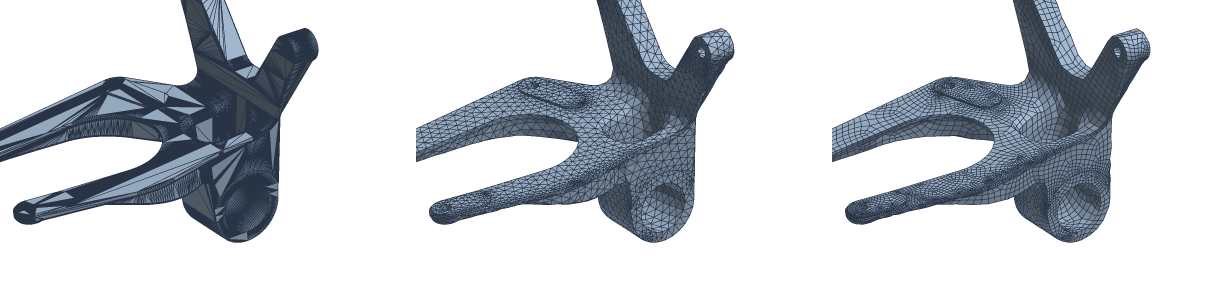
A CAD bracket, remeshed in triangles and quads. Compare the element layout around the holes, ribs and curved surfaces.
Explore surface meshing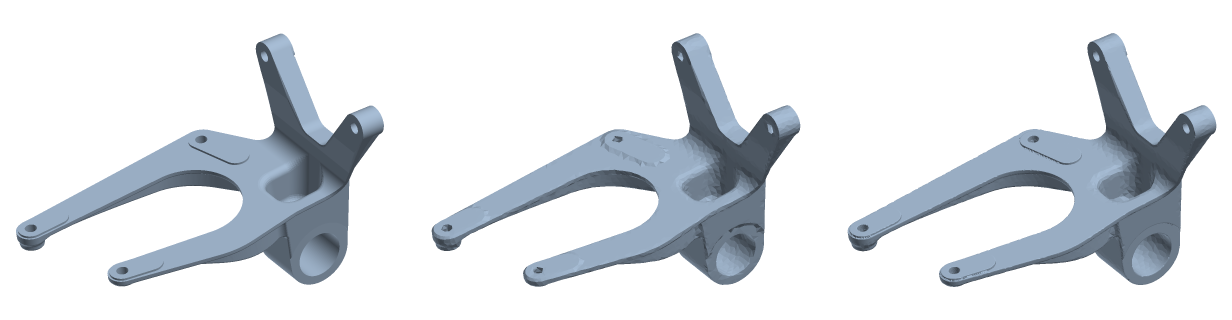
Build a closed surface around an input mesh. This example compares wrapping with and without sharp-edge preservation.
Explore repair tools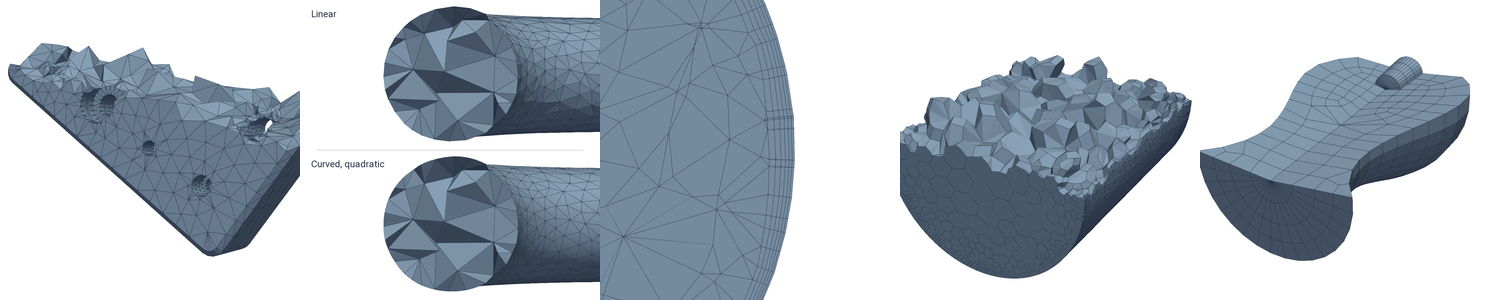
Volume meshes for finite element and finite volume workflows. The volume module is available as a preview.
Explore volume meshingFrom input to analysis
The preparation work,
in one place.
Use the tools a job needs. Inspect and convert a file, build a surface mesh, or prepare a part for manufacturing.
Prepare CAD models
Check and heal CAD geometry, generate surface meshes and retain CAD face groups in the output.
CAD tools 02 / MeshBuild the mesh you need
Generate triangles or quads, mesh assemblies, and extract mid-surfaces and centrelines for shell and beam workflows.
Meshing tools 03 / RepairWork through mesh defects
Repair surfaces, correct face orientation, remove noise and wrap difficult input in a closed surface.
Repair tools 04 / ShapePrepare the part
Cut and combine geometry, remove small features, hollow parts and split models into convex pieces.
Shape toolsRepeatable by design
A workflow you can
put in a script.
Chain operations in memory, write scripts that loop over parts and act on what Betti reports, or let a coding agent run the commands for you.
Use the same executable on your workstation and your compute nodes, and compare every output to its input with built-in reporting.
See the examples# Inspect the input
betti info part.stl
# Repair and remesh in one run
betti run part.stl prepared.obj \
fix repair + mesh remesh -size 1%
# Measure the result against the original
betti verify part.stl prepared.obj# betti script remesh-all.star parts/*.stl
for path in args:
m = mesh.remesh(fix.repair(path), size = "1%")
print(path, m.faces, "faces, smallest angle", info(m).min_angle)
save(m, path.removesuffix(".stl") + ".obj")# Once: give your coding agent Betti's commands
claude mcp add betti -- betti mcpRepair every STL in parts/, remesh each to 1% of its size, and tell me which still have holes.
Chains, scripts and agents use the modules of the commands they run.
Inspect before you proceed
Know what changed.
Geometry preparation needs more than a good-looking mesh. Betti includes tools to inspect the input and measure the result.
See the verification tools- Geometry
- Measure deviation from the input and inspect retained features.
- Mesh quality
- Inspect element quality, orientation and self-intersections.
- Topology
- Check components, boundaries and changes to the shape’s connectivity.
Recent releases
Growing
release by release.
Betti was first released in October 2026. Behind it is groundwork going back to 2017, a PhD included, bringing personal code and ideas together with the state of the art from academic research. Repair, CAD, volume meshes and automation have followed. These are the latest milestones.
- / v0.27
Pictures and drawings
Pictures of meshes and CAD models with sharp vector edges, engineering drawing sheets, and lossless conversion.
- / v0.26
Scripts and coding agents
Every command can be called from a script or by a coding agent. Repair and booleans keep touching solids apart.
- / v0.25
Healing real-world CAD
Healing sews across the parts of assemblies and repairs far more real-world STEP models.
Start with one of your files
See where Betti fits.
Download the executable and try the core inspection, conversion and verification tools. Request the modules you need when you’re ready.
Free for personal use, teaching and qualifying academic research. License terms